29 November 2011

Offlease Computer Sale $50 each


The following off lease computers are available for $50 each.  These are high end Pentium 4's and would work well for someone that just needs email and light web browsing or as a KIOSK/terminal for visitors.
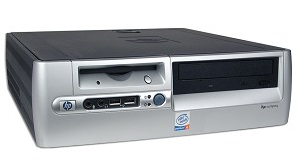
HP DC530 Slim Desktop
Pentium 4 - 2.80 GHz
Intel Graphics On Board
SoundMax Audio (can play sound without speakers)
1 GB RAM
40 GB Hard Drive (30 GB of available free space)
DVD/CD Burner
GB Ethernet 
Windows XP Pro SP3
No Monitor

Note: Keyboard and Mouse are not included

Application Software Pre-installed:
AVG Antivirus 2012 Free Edition
LibreOffice 3.4 (MS Office Alternative)
Nero Express (CD/DVD Burning Software)

Three units are available only.  All sales are final - 30 day warranty against hardware failure. Cash sale only.

Contact Polarverse for more information 519.489.0646  or click here to email.  
Only serious inquires will receive replies.  Sales are on a first come first serve basis.

21 November 2011

Free E-waste Collection Event Sat Nov.26th - Cameron Heights Collegiate Institute


Cameron Heights Collegiate Institute & Eco-Tech Recycling will host a free e-wast collection event on Saturday Nov 26th from 10am to 4pm in support of Kiwanis | unicef.

For a list of acceptable electronic waste - CLICK HERE


06 November 2011

Daylight Savings Time & Your Computer

If your computer's time zone and daylight savings time were setup correctly then you should be seeing the correct time on your computers this morning.  However if you're in the wrong time zone or daylight savings is not enabled then you may be running an hour ahead this morning.  For general non-computer related info on DST check out this LINK

Here are some tips and info on how to change or check your settings:

Windows 7 Users

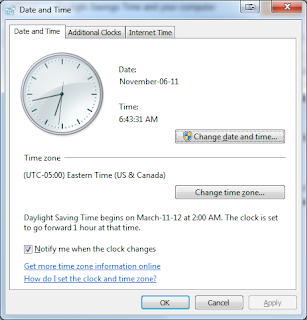
  1. Click on the clock on the bottom right corner of your screen
  2. Click on "Change Date and Time Settings"
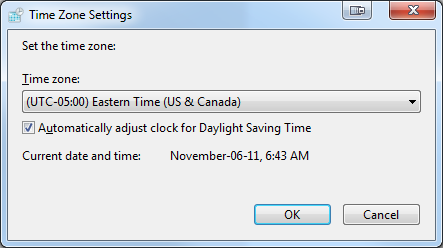
  3. You can change the date and time by clicking the "Change date and time.." button to change the time zone and/or enable DST click the "Change time zone.." button.  As you can see from the 2nd image below there is a check box to adjust the clock for DST.


Windows XP Users
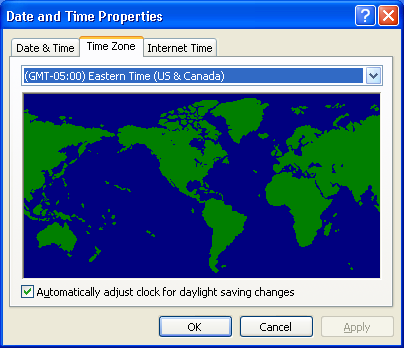
  1. DoubleClick on the clock on the bottom right corner of your screen
  2. Click on "Time Zone" tab at the top
  3. You can change the date and time by going back to the Date & Time tab.  From the Time Zone tab you can change your zone and make sure the check box for DST is checked off.

Macintosh
  1. Go to the Apple Menu in the top left corner of your screen and select "System Preferences"
  2. Click "Date & Time" in the System section of the screen
  3. Click the Time Zone button.  By default it should be set to automatic (there is no DST option just zone).  If your time zone is not correct uncheck the "Set time zone automatically...." option and use the drop down to select your location manually.
  4. For more info on Mac and DST click here